Penguin Blush: A Handwritten Font for Modern Web Design
In the world of digital product creation, typography is not merely a vessel for text; it is the primary driver of user experience and brand perception. As a web designer who spends countless hours balancing aesthetics with functionality, I have learned that choosing the right typeface can make or break a layout. This is where Penguin Blush enters the conversation. It is more than just another script font; it is a carefully crafted display typeface that brings warmth, approachability, and a distinct personality to digital interfaces. For designers looking to inject character into their projects without sacrificing readability, Penguin Blush offers a unique solution within the Script Handwritten category.
The Personality of Penguin Blush in Digital Layouts
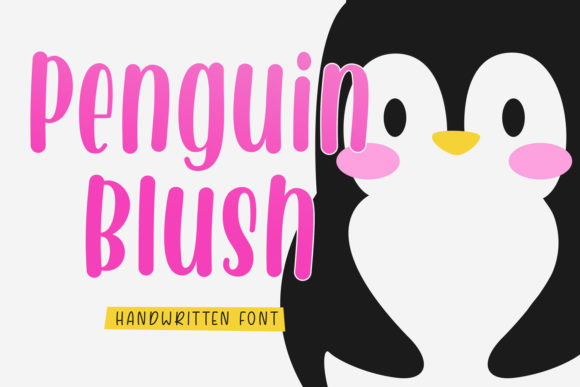
When we talk about font personality, we are discussing the emotional response a typeface evokes before a user even reads the content. Penguin Blush is described as cool, relaxed, and friendly, which translates beautifully into modern web design. Unlike aggressive or overly ornate script fonts that can feel chaotic on screen, Penguin Blush maintains a jolly and warm tone. This makes it an excellent choice for brands that want to appear accessible and human-centric.
Visually, the font features smooth, flowing lines that mimic natural handwriting but with enough structure to remain legible at various sizes. This balance is crucial for digital environments where screen resolution and viewing distances vary. The "blush" aspect of its name suggests a softness, a gentle touch that can soften the often rigid grid structures of web layouts. When used correctly, it transforms sterile sections into inviting spaces, encouraging users to linger and engage with the content rather than bouncing away due to visual fatigue.
Ideal Use Cases for Web and UI Design
While Penguin Blush is a creative font, its application requires strategic thinking. In web design, hierarchy is king. Using a decorative handwritten font for body copy is generally a mistake, as it can hinder scanning behavior and reduce accessibility. Instead, Penguin Blush shines when used as a display font for high-impact areas.
- Hero Sections: Use Penguin Blush for main headlines on landing pages. Its bold presence grabs attention immediately, setting a positive tone for the user journey.
- Call-to-Action (CTA) Elements: While full buttons might be better served by sans serif fonts for clarity, short phrases on banners or promotional overlays can benefit from the font’s charm.
- Boutique Online Stores: For e-commerce sites selling handmade goods, cosmetics, or lifestyle products, Penguin Blush adds a personal touch that aligns with artisanal branding.
- Creative Portfolios: Designers and photographers can use it to sign off on project titles or introduce themselves, adding a signature-like quality to their work.
- Digital Products: Course sales pages, coaching websites, and blog headers can leverage the font to create a sense of mentorship and friendliness.
By reserving Penguin Blush for these specific elements, you maintain a clear visual hierarchy. The eye is drawn to the headline first, then guided down to the supporting text, creating a natural reading flow that supports conversion-focused layouts.
Readability and Responsive Considerations
One of the biggest challenges with script fonts is ensuring they perform well across devices. Penguin Blush is designed with digital screens in mind, but best practices still apply. On mobile screens, where space is limited, large blocks of handwritten text can become illegible. Therefore, it is essential to use Penguin Blush sparingly and ensure adequate line height and letter spacing.
When placing Penguin Blush over image overlays or dark backgrounds, contrast becomes critical. Ensure the text color stands out sharply against the background to maintain readability. If using a light background, consider slightly reducing the font weight if available, or increasing the size to compensate for the lack of visual weight. Testing your design at various breakpoints is non-negotiable. What looks charming on a desktop monitor might look cramped on a smartphone. Always verify that the font retains its friendly character without compromising usability.
Effective Font Pairing Strategies
No font works in isolation. To maximize the impact of Penguin Blush, it needs a reliable partner. The general rule of thumb is to pair a decorative display font with a simple, neutral typeface. For Penguin Blush, a clean sans serif font is often the best choice for body copy. Fonts like Inter, Roboto, or Lato provide a stark contrast that highlights the whimsy of the script while ensuring that paragraphs of text remain easy to read.
Alternatively, for a more editorial or sophisticated digital identity, you might pair Penguin Blush with a classic serif font. This combination can evoke a sense of tradition mixed with modern playfulness, suitable for luxury brands or high-end blogs. The key is to let one font take the lead in personality while the other handles the heavy lifting of information delivery. This duality creates a balanced typographic system that feels professional yet creative.
Licensing and Commercial Usage
For web designers and digital product creators, understanding licensing is as important as design skills. Penguin Blush is a commercial font, meaning its use in client projects, online stores, and branded web experiences requires appropriate licensing. Whether you are building a custom WordPress theme, designing a Shopify template, or creating social media graphics for a brand, you must ensure you have the correct rights to use the typeface.
Check the included styles and file formats to ensure compatibility with your workflow. Most modern fonts come in OpenType or WOFF/WOFF2 formats, which are optimized for web performance. Additionally, verify if the font includes multilingual support if your target audience spans different languages. Proper licensing protects you from legal issues and ensures that your clients’ brand assets are secure. Investing in high-quality, properly licensed fonts like Penguin Blush demonstrates professionalism and respect for the craft of type design.
Conclusion for Designers
Penguin Blush is a versatile addition to any designer’s toolkit. It bridges the gap between playful creativity and professional polish. By integrating this handwritten font strategically into your web designs, you can enhance brand trust, improve user engagement, and create memorable digital experiences. Remember to prioritize readability, test thoroughly across devices, and pair it wisely with complementary typefaces. When done right, Penguin Blush does not just decorate your site—it elevates your entire brand identity.